
NYU Langone Health
NYU Langone HealthMedical
4.52.76K Reviews
- Version
- 2.22.0
- Installs
- 500.00K
- Age Rating
- Everyone
Screenshots
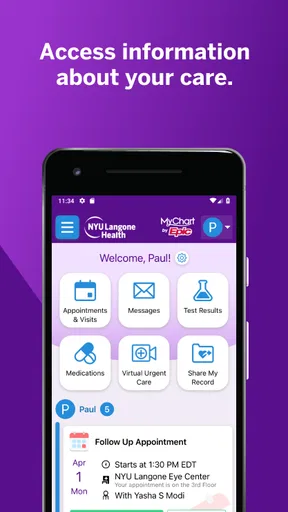
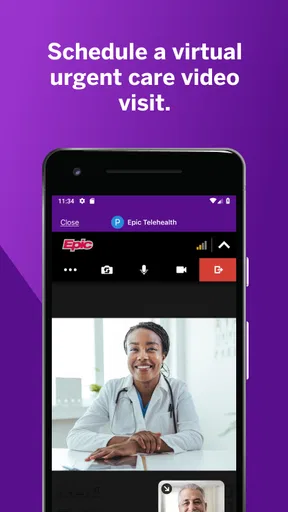
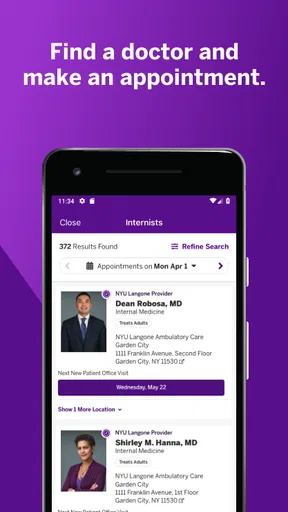
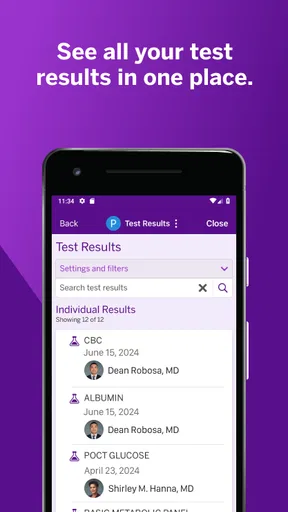
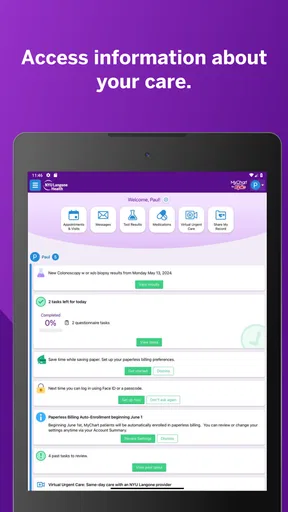
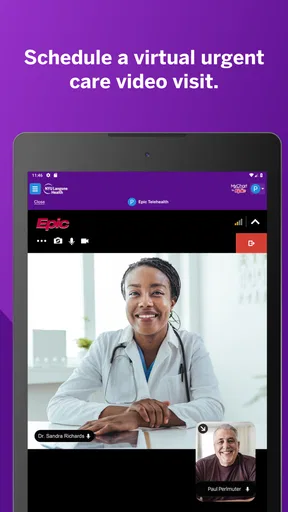
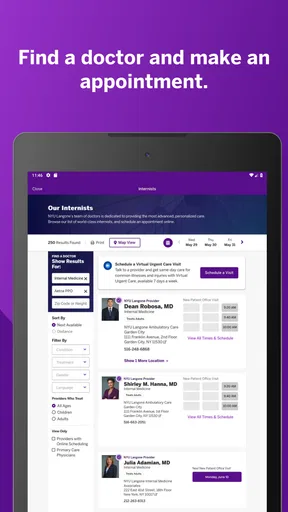
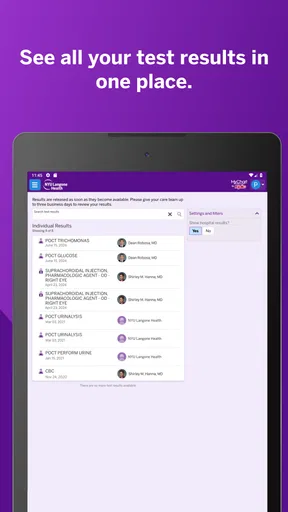
Our Review of NYU Langone Health
 Analysis by Appyee
When a health app asks me to sign in, I judge it differently from a weather app or a game. I want a clear reason for the account, sensible control over my information, and a useful experience once I am inside. NYU Langone Health is a medical app from NYU Langone Health that puts access to personal health information at the center of the experience. It is free, aimed at Everyone, and available for devices running iOS 11 or later.
My overall impression is that this is best understood as a digital doorway to care rather than a general wellness companion. It makes sense for someone who already uses NYU Langone Health and wants a more convenient way to reach their health information. It is much less compelling for a person looking for exercise coaching, symptom entertainment, medication reminders, or a broad collection of self-care tools.
The app has been available since April 26, 2017, and its current version is 2.22.0. Its public reception is strong, with a 4.5 average from around 6,000 ratings, while the app has passed 500,000 installs. Those figures suggest that it has become a familiar part of many patients’ routines, but popularity alone is not a reason to hand over attention or personal information. The more important question is whether the app gives me enough control and clarity to use it comfortably.
What the app is really for
I see this section as a way to set expectations before getting into day-to-day use: the app is most useful when it supports an existing relationship with NYU Langone Health, not when it is treated as a catch-all health tool. That distinction helps me decide what to open it for, what to handle elsewhere, and how to make a repeatable routine without expecting more than a patient-access app can offer.
A patient-access tool rather than a medical advice replacement
The central value is straightforward: I can use the NYU Langone Health app to reach my health information away from a desktop computer. That sounds simple, but it solves a practical problem. Health information is often needed at awkward moments: while preparing for an appointment, checking a previous instruction, reviewing something with a family member, or trying to remember which detail to mention to a clinician.
I would not treat it as a substitute for professional medical judgment. A patient portal can help me see and manage information, but it does not turn a phone into a diagnostic service. If I were dealing with urgent symptoms, I would not spend time searching through an app for reassurance. The appropriate medical route should come first, with the app serving as a supporting tool when it is suitable.
This distinction also helps explain who should skip it. If I do not receive care through NYU Langone Health, the app is unlikely to become a useful everyday health dashboard. A general health app, an insurer’s application, or the portal connected to my own healthcare provider would probably be a better fit. Installing it simply because it is free would not create much value without a connection to the organization behind it.
The everyday situations where it earns its place
Imagine that I am leaving a visit and later realize I cannot remember one part of the care plan. A portal app can be more practical than calling a clinic just to recover information I may already be able to access. In another situation, I might be sitting in a waiting room and want to review relevant health details before speaking with a clinician. The benefit is not excitement; it is reducing small points of friction around care.
A useful habit would be to open the app before an appointment rather than during the conversation. I could check what information I may want to discuss, make a short note for myself, and avoid relying entirely on memory. That workflow treats the app as preparation and reference, not as an authority that decides what matters medically.
It can also be helpful when I am away from my usual computer. A phone is easier to carry, and the app’s purpose is specifically mobile access to health information. Still, convenience should not make me careless. I would avoid opening sensitive information on a shared device or in a crowded place where someone could read the screen.
How it compares with ordinary alternatives
The usual alternative is a web browser and a patient portal. A browser may be preferable when I need to work with several windows, read a long document, or type extensively. A phone app is more natural for quick checks, especially when I am already away from a desk. The trade-off is that a mobile screen gives me less room to understand dense medical information at a glance.
Another alternative is contacting the clinic directly. Calling can be the better option when I need clarification, when an issue is urgent, or when the information I see does not answer my question. The app may save time for straightforward access, but it should not become a barrier between me and a human being when interpretation is needed.
General health apps offer a different kind of experience. They may focus on habits, fitness, nutrition, or symptom tracking, while this app’s identity is tied to NYU Langone Health and access to health information. Comparing them as if they served the same purpose would be misleading. I would use a general wellness app for ongoing lifestyle goals and this one for patient-related access.
Trust begins with the account boundary
Medical information deserves a higher level of caution than ordinary app content. Before using the app, I would pay attention to how the sign-in process works, what account it expects, and whether the screen clearly identifies the organization I am dealing with. The key trust signal is not a glossy design; it is whether the app makes the relationship between my account and NYU Langone Health understandable.
I would also avoid treating an automatic sign-in as proof that the app is safe in every situation. Convenience can be useful on a personal phone, but it becomes a concern if other people can unlock the device. My practical rule is simple: use the app on a device with a strong screen lock, keep the operating system supported, and sign out or protect access when the phone is shared.
The age rating of Everyone describes the app’s store classification, not the sensitivity of the information I may view inside it. That is an important distinction. A medical app can be suitable for a broad audience while still containing intensely private content for each individual user. I would make privacy decisions based on the account and device context, not just the store label.
What I would check before relying on it
I would look for visible account controls and read any privacy or data-use explanation presented during setup or inside the app. I would want to understand which choices are available, whether notifications can be adjusted, and how to manage access if I change phones. I would not assume that every setting is enabled or disabled in the way I prefer; I would inspect the options myself.
That is especially important for notifications. A message preview on a locked screen may reveal more than I intend to show. If the app offers notification controls, I would choose a discreet display or turn off previews when privacy matters more than convenience. This is a small setting with a large practical effect in households, workplaces, and public transport.
I would also review the account after changing a password or replacing a phone. A responsible workflow includes checking whether the old device still has access and whether the new device is protected. These are not glamorous features, but they are the kinds of controls that determine whether a health app feels manageable over time.
Data-sensitive moments need deliberate choices
The most sensitive moment is not necessarily installation. It is often the point when I am using the app in public, receiving a notification, or handing my phone to someone else. Health details can appear unexpectedly if I have not considered previews, screen visibility, and device access. I would use the app in a private setting whenever I need to read anything detailed.
Another sensitive moment comes when I am unsure whether information is current or complete. I would not copy a medical detail into another service without thinking about where that second service stores it. Moving information between apps can make life easier, but it also expands the number of places where sensitive content exists. My preference would be to share only what is necessary and only through a channel I understand.
I would take the same care with screenshots. A screenshot may seem harmless because it stays on my phone, yet it can be backed up, shared, or exposed through another application. If I needed to show information to a caregiver, I would first consider whether a more controlled method was available. The app can provide access, but I remain responsible for what I copy and where I send it.
Useful agency is more than having an account
For me, user agency means being able to decide when to look, what to share, and how visible the information is. The app is most trustworthy when it supports those choices without making them mysterious. I would rather spend a minute checking settings than assume that the default experience matches my privacy preferences.
I would also keep my contact details and account information current if the app provides a way to manage them. Outdated information can create its own kind of friction, particularly when I am trying to access care-related communication. At the same time, I would avoid adding unnecessary personal details merely because a field is available. A good rule is to provide what is needed for the service and pause before supplying anything optional.
For families and caregivers, the boundary is even more important. I would not casually share my login with another person. If someone needs to help me, I would look for an appropriate account or access arrangement within the healthcare system rather than turning my credentials into a permanent key. Shared passwords are difficult to control and difficult to revoke cleanly.
Where the experience may feel limited
The app’s focused purpose is also its main limitation. I would not expect it to replace every healthcare interaction or answer every practical question. A patient-access app can be valuable for retrieving information, but it may feel narrow if I want a unified view of services from several unrelated providers.
The mobile format can introduce another limitation: reading and interpreting medical information on a small screen is not always comfortable. If I am reviewing a lengthy result or trying to compare several details, I may prefer a larger display. That is not a failure of the app so much as a reminder that mobile access and deep review are different tasks.
There is also a difference between access and understanding. Seeing a medical term does not necessarily explain what it means for me. I would resist the temptation to search for an immediate conclusion based on one isolated item. When something looks confusing, unexpected, or inconsistent, contacting the relevant healthcare professional is a better next step than guessing.
Who will benefit most
I think the strongest audience is an existing NYU Langone Health patient who values quick access from an iPhone or another supported device. It is particularly practical for people who often move between home, work, appointments, and travel, and who do not want their health information tied to a desktop browser.
It may also suit someone who is becoming more organized about appointments and personal records. Used thoughtfully, the app can become part of a preparation routine: check information before a visit, note questions separately, review relevant details afterward, and protect the phone when finished. That approach turns a passive portal into a small but useful part of personal healthcare organization.
I would be more cautious recommending it to someone who shares a phone, struggles with account management, or expects immediate answers to medical concerns. Those users may need extra help with device security, or they may be better served by direct contact with a clinic for issues the app cannot resolve on its own.
My cautious verdict on trust and usefulness
After looking at it as a medical access tool, I see a sensible reason to use it: it brings NYU Langone Health information closer to the patient when a computer is inconvenient. Its free price removes a financial barrier, and its established presence, current version 2.22.0, and broad adoption make it a reasonable option for people connected to this healthcare provider.
My recommendation comes with a clear condition: I would use it intentionally, not casually. I would protect the device, review account and notification choices, avoid public exposure, and remember that access to information is not the same as medical interpretation. Those habits matter as much as the app itself because the most serious risks often come from misplaced visibility or careless sharing.
My bottom line is that NYU Langone Health is worth installing when it matches your existing care relationship and you want convenient mobile access. I would choose a browser for extended reading, direct clinical contact for urgent or confusing matters, and a separate wellness app for lifestyle tracking. Within its proper role, this app can be useful and practical; outside that role, expecting it to act like a complete healthcare assistant would lead to disappointment.
Verdict
Strengths of NYU Langone Health
- Easy access to appointments, test results, and medical records.
- Secure messaging helps you communicate directly with care teams.
- Prescription refill requests can be submitted from the app.
- Telehealth visits may be available without visiting a facility.
- Health information is organized in one convenient place.
Limitations of NYU Langone Health
- Some features may require an NYU Langone patient account.
- Appointment availability depends on your provider and location.
- Notifications can be easy to miss if permissions are disabled.
- Certain services may redirect you to external webpages.
- The app may feel complex for users managing multiple accounts.
Similar Picks in This Category
View All
WebMD: Symptom Checker
WebMD, LLC4.1

Microphone Amplifier
DOSA Apps4.2

Anatomy Learning - 3D Anatomy
3D Medical OU4.5

Period Tracker and Calendar
SimpleInnovation4.9

GoodRx: Prescription Coupons
GoodRx4.8

CVS Health
CVS Pharmacy4.5
Frequently Asked Questions
What is the NYU Langone Health app used for?
The NYU Langone Health app is designed to help patients manage many healthcare tasks from a mobile device. Depending on your account and location, you can schedule or request appointments, view test results, message care teams, review medications, access visit summaries, check bills, and find information about NYU Langone services. It works as a convenient companion to the health system, but it does not replace emergency care or direct medical evaluation.
Do I need to be an NYU Langone patient to use the app?
Most of the app’s personalized features require an active NYU Langone Health MyChart account, so patients generally need to receive care within the NYU Langone system or have an eligible relationship with the organization. Some public features, such as locating hospitals, doctors, services, or general health information, may be available without signing in. Access can vary by region, age, account status, and the services connected to your medical record.
How do I sign in to NYU Langone Health, and what if I forget my password?
After installing the app, you can usually sign in with your NYU Langone Health MyChart username and password. Depending on your device, biometric login such as Face ID, Touch ID, or fingerprint authentication may make future access faster. If you forget your credentials, use the recovery options on the sign-in screen or contact NYU Langone support. Never share your password or verification codes with another person.
Can I schedule appointments and communicate with my doctor through the app?
The app may allow eligible patients to request or schedule certain appointments, view upcoming visits, complete pre-visit tasks, and communicate securely with participating care teams. Availability depends on the specialty, provider, appointment type, and your patient account. Messaging is intended for non-urgent questions and may not receive an immediate response. For severe symptoms, a medical emergency, or time-sensitive concerns, contact emergency services or seek urgent care instead.
Is the NYU Langone Health app safe, free, and available on both Android and iPhone?
The official NYU Langone Health app is generally available as a free download for supported Android and iOS devices, although normal internet or mobile-data charges may apply. It uses account authentication and security measures intended to protect personal health information, but users should still keep their operating system updated, use a device passcode, and avoid signing in on shared or public devices. Download only from the official Google Play Store or Apple App Store.
